In Part 1 we went over how Marketing teams operate today and a case for a unified marketing platform. In this article we’ll walk through the components of the Marketing Operating System and how they can form an interoperable network of workflows to build an efficient marketing engine.
But before that a quick reminder from the previous article on first principles of Product Marketing – Marketing is all about how users find your product and build enough trust that it can solve a deep user pain point in a cost effective manner.
MOS
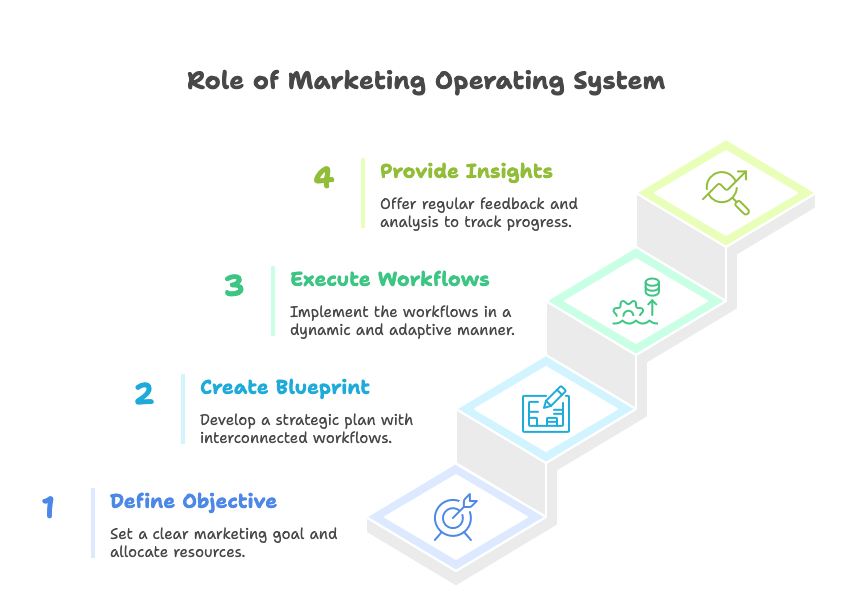
The way I like to think about the role of MOS to achieve the above is in four steps –
- Start by feeding MOS an
objectivesuch as “Expand my paying customer base in EU” and then allocate tangible resources such as a budget of $100,000 and time of 3 months. - MOS generates a
blueprintand a tangible goal (say +2% increase in EU paying customers) to achieve the objective. The blueprint is a network of workflows derived from the context that MOS is aware of using internal and external data (see Context Awareness). The blueprint can be further iterated on and revised if needed with additional human expertise. - Next step is for MOS to execute the workflows in the blueprint in a specified order. It’s important to think of these as
dynamic workflowsmeaning they can be long running and self correcting based on the information available or via human intervention. - MOS gives provides periodic
insightson the budget allocation, the ROI of various marketing strategies deployed and how it’s tracking to the overall initial objective.
These steps translate to three functional units of MOS – Blueprint, Insights Hub, AI-native CRM
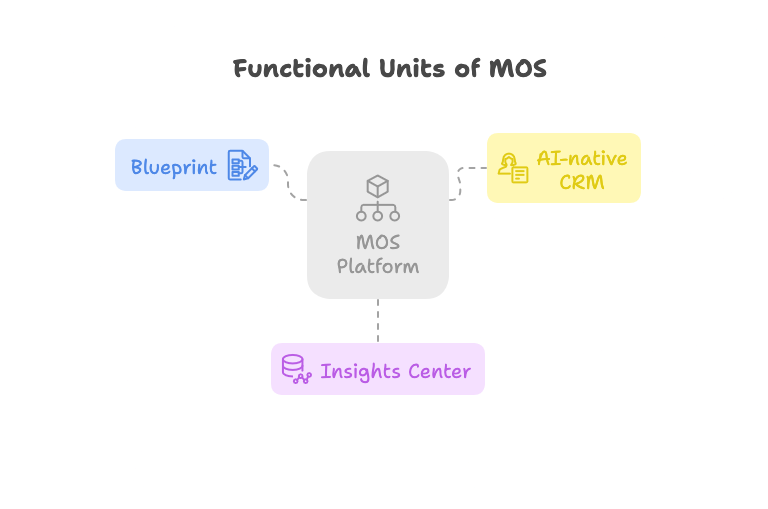
Blueprint
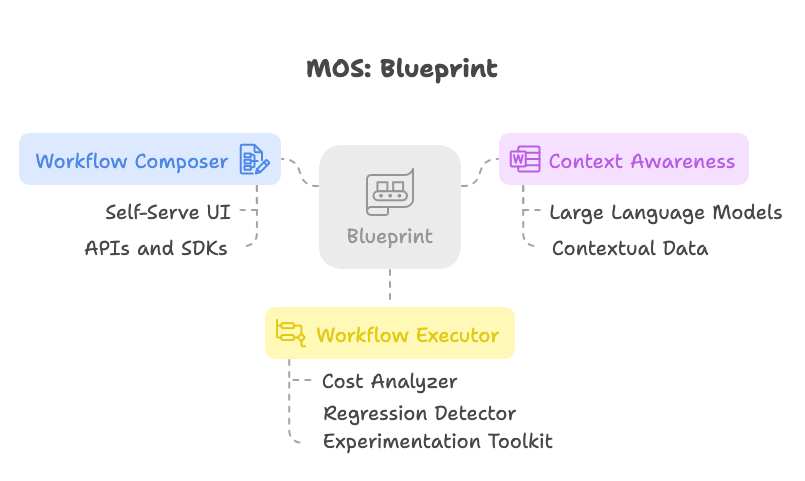
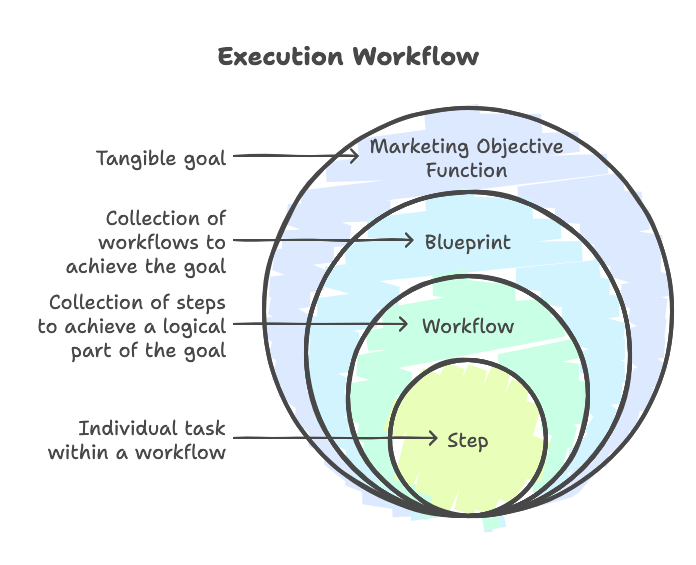
Think of blueprint as a wrapper to the core execution engine, called a workflow. It’s responsible for achieving the objective function and can chain multiple workflows together. The internals of a blueprint is where all the heavy lifting is done and worth deep diving into specifically the workflow composer, context awareness and workflow executor.
Workflow Composer
A workflow is a chain of steps to perform an action in a specified order. For e.g. you could have a workflow where step one could be search for customers in a specific region and step two could be find contact information and step three would be email these users. Each step is a unit of work of execution within a workflow.
While these steps may appear trivial on surface, the workflow abstraction can standardize the format of inputs and outputs to and from each step, provide observability and analytics, replayability and many more.
Workflow composer should support two interaction modes –
1. Self serve UI
Caters to users who prefer a visual interaction mode with drag and drop components that form the steps of the workflow. Components could be offered via a marketplace of open source and commercial options. E.g. slack integration, email template builder, and csv uploader or proprietary options such as scanning Notion or JIRA docs etc.
💡 Self serve UI could be a great way to quickly deploy and play around with simple workflows and test them out.
2. APIs and SDKs
Developer friendly interaction model that allows Engineers to dynamically build and trigger a workflow from in-product actions.
Imagine a new user lands on your marketing landing page you could trigger a workflow to sessionize their actions and uses a classifier model to predict their intent and send a daily report of qualified leads to the marketing team.
💡 Performant and intuitive APIs and SDKs are a great way to simplify complex real time workflows without having to manually move data from one system to another. Furthermore it gives engineers more control to regulate the flow and integrate with the core product experience.
Context Awareness
Workflows are essentially executing some instructions and passing context from one step to another to achieve a defined objective. Large Language Models (LLM) today are quite capable of predicting with a generic set of instructions. By augmenting an LLM with rich and relevant context MOS turns into an effective reasoning model that can predict the shape of a workflow and the sequence of steps.
Let’s take an example.
Going back to the objective we defined above “Expand my paying customer base in EU” which is a natural language query that can be fed to a client application like Claude that has access to a LLM. The LLM model is most likely going to give you a generic answer on how to do this which is not going to be very helpful.
But now lets say you feed the objective to MOS that not only has access to a LLM but also to your existing customer relationship manager (CRM) and analytics database. It can use this knowledge to provide additional context to the LLM and enrich it’s reasoning ability to provide a more targeted marketing workflow that could like the following –
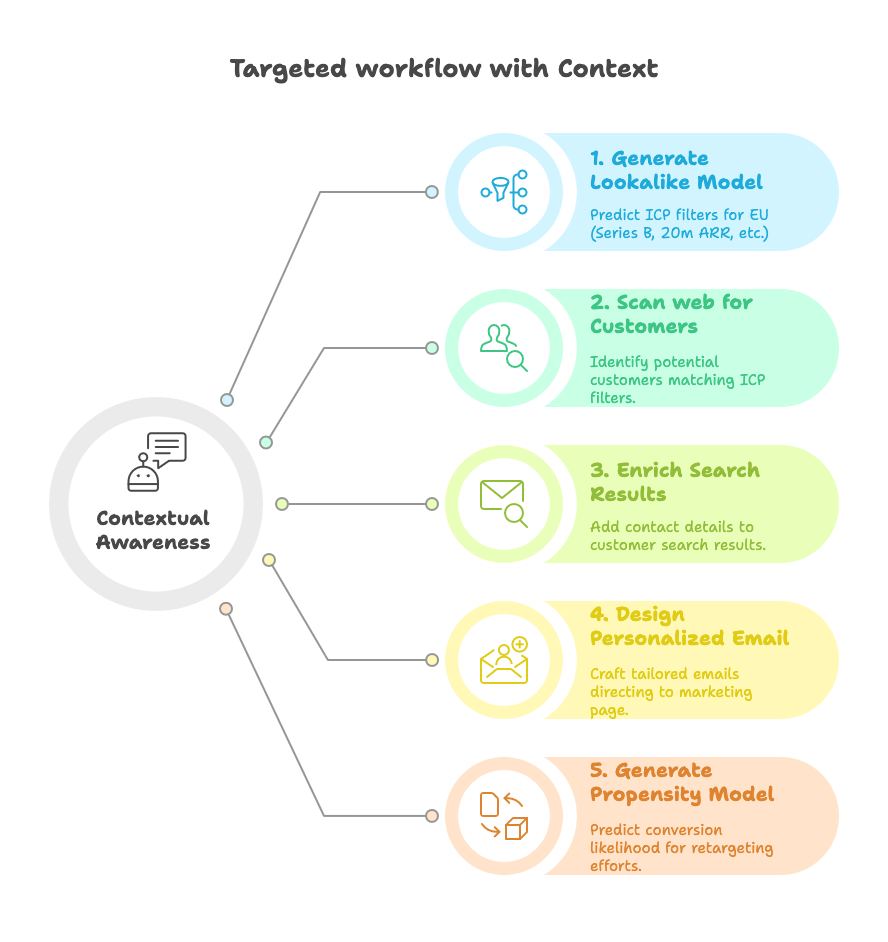
With relevant context and the right prompts with a human in the loop, marketing workflows can be entirely built from natural language queries.
💡 Model Context Protocol (MCP) architecture is a great example on how context can be passed around to LLMs in an interoperable fashion using tools and resources. At a high level, you can think of MOS as a MCP client and context providers as tools that have access to resources (ML models, Database, etc.) and can be registered with the client. Each tool is essentially an MCP server implementation that takes the input from the client, generates the context and passes it back to the client.
Workflow Executor
Now that we have a Workflow designed and configured either using self serve UI or API/SDKs or just take a natural language query and enriched with context and generate a workflow using LLM reasoning, the next step is the executing the workflow.
Workflow is essentially a directed acyclic graph where each step of the workflow is a node and the dependency between steps can be indicated via an edge.
The job of Executor is to execute the graph from the root node by following a topological sort of the graph.
From a technical standpoint, the Executor must provide the following
- Measure and display the $ cost of each step in the workflow – Cost can vary by the type of operations involved. For e.g. if the work involves accessing an LLM model you should be able to calculate the number of tokens consumed and project the cost or if the work involves contacting a third party service to send an email you should be able to calculate the cost of sending emails to the list of users processed in that step.
- Observability into each of the steps that can detect and diagnose regressions – Let’s say one of the steps in the graph takes longer than usual or the cost doubles from previous runs, the executor must be able to detect and alert the workflow owner of the regression.
- Intermediary data store for state management – Each step may be processing large amounts of data and machine failures are inevitable. An intermediary data store can help with storing the state of the execution that can help to resume execution from where it left off.
- Experimentation toolkit – Experimentation (A/B Testing) should be at the core of your marketing strategy. In other words you should be testing different versions of strategy (different email copies, different landing pages, etc) and let MOS dynamically determine the most effective strategy using techniques such as multi-armed or contextual bandits.
This covers the internals of blueprint at a high level. As a reminder blueprint is an abstract concept that wraps a marketing objective with suitable workflows to achieve a tangible goal built from context awareness.
Next up is the Insights Hub.
Insights Hub
A Marketing platform without Insights can do more harm than good. It’s easy to conflate Analytics and Insights but they are not the same.
❌ 1000 users clicked on the email campaign and landed on your marketing page is Analytics.
✅ ROI on Email outreach is 2x higher than Paid Ads in EU, consider running an email outreach campaign for EU users is an Insight.
A common pitfall by focusing more on Analytics is “Analysis Paralysis” which happens when users are inundated with several (often insignificant) data points that may potentially conflict each other and you make a wrong conclusion or even worse gets the team spinning in circles and delays decision making.
An Insight should have a clear call to action and tied back to a goal or objective. It should be decomposable to show the data points that led to the Insight. Insights are backed by a hypothesis that can be proved with a causal relationship, everything else is just an intuition.
However looking at a million slices of data and distilling signal from noise and coming up with a hypothesis is the challenge. It takes 80% analytical rigor and 20% engineering rigor. The engineering rigor comes from investing in a foundational data platform early on and evolves as the product grows. The quality of your data platform defines the quality of your data which defines the quality of your insights and what makes a great marketing platform. It’s the 20% investment that can drive the business. Read more here in Data meets Product series on what it takes to build a data platform.
The analytical rigor comes from shifting to a asking questions mindset and keeping aside pre-conceived notions. Without getting too philosophical here, it really starts with getting a deep understanding of your business model and the competitive landscape. Next is you need to put yourself as the user of the product and think of the various user personas that interact with the product. Third is creating a culture of sharing and democratizing learnings, evangelize common and well understood terminology and emphasize simplicity.
How Insights are consumed can play a critical role in it’s effectiveness. Analytical dashboards and automated reports are typically the most common consumption surfaces. While they are useful to some degree they are not the most effective for the following reasons –
- requires users to visit the dashboard and derive your own Insights assembling various data points.
- insight can be ephemeral in nature and change over time and action-ing on a delayed insight can be counter productive.
- lack ability to follow up questions besides pre-determined slice and filters.
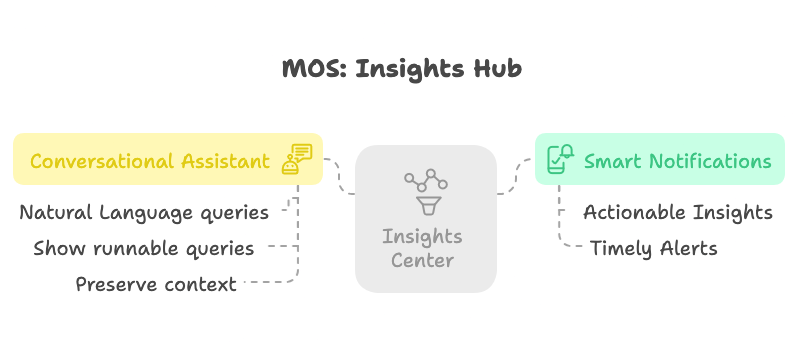
Extending dashboards with smart notifications and conversational assistants amplifies the effectiveness of Insights.
Smart Notifications
Notifications follow a push model where the user gets notified when there is an actionable insight. For example, let’s say there is a degradation in the recall of the lookalike model used in your workflow, notifying the workflow owner in a timely manner with the specific data point indicating the degradation and a corresponding action to take will be lot more effective than a static dashboard.
Less is more when it comes to notifications to boost it’s value. To achieve this use a ranking model that leverages –
- Relevance signals as opposed to chronologically ordering over time.
- User feedback signals on the effectiveness of the notification such as mark_as_completed, useful, not_useful labels.
Conversational Assistant
Good insights should lead to more questions and spark curiosity. Dashboards are a good starting point but there’s only so much you can fit on the canvas to answer follow up questions.
Let’s say the dashboard shows a timeseries of a number of users who clicked on an email in the last 7 days. Based on this data you may have a follow up question on how many of these users were receiving a marketing email for the first time and that leads to questions on the actions they take after clicking on the email and so on. Conversational assistants built with LLMs can take such natural language questions and turn those to runnable queries and output answers to preserve the continuity.
AI-native Customer Relationship Manager (CRM)
Having a central database of all customers (prospects and acquired) is the foundation for generating marketing workflows, commonly known as Customer Relationship Manager (CRM). The data quality and the ease of use of the CRM directly impacts the efficiency of MOS.
Traditional CRM tools require manually inputting customer details and create a clunky user experience where the majority of the team is spent inputting details or building integrations rather than gleaning actionable insights on how to acquire customers. This is primarily due to the fact that manual data is unstructured (phone calls, email logs, webinars, in-person meetings, etc) and don’t necessarily conform to a fixed schema.
AI-native CRM tools if built right can efficiently automate these tasks for humans so the focus is more on the value unlock.
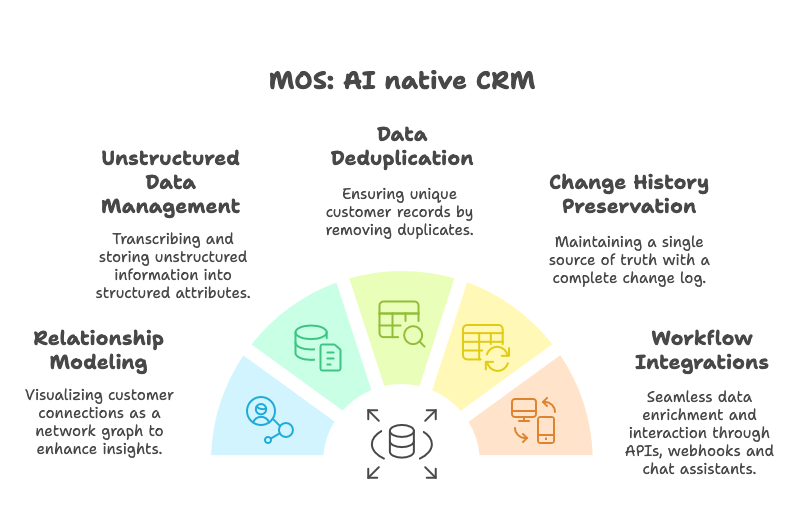
There are a few attributes that are unique to storing customer details that a AI-native CRM can unlock out of the box
- Modeling relationships between customers to showcase the network graph.
- Transcribe and store unstructured information into customer attributes.
- De-duplicate customers and customer attributes.
- Preserve history of changes to the attributes and have a single source of truth for a customer record.
In terms of workflows and integrations, a AI-native CRM can unlock –
- Semantic layer integration with Data warehouse to enrich customer attributes with actionable insights.
- Natural language queries rather than static daily reports.
- Webhook implementations when a customer record is updated.
- CRUD APIs to interact programmatically with customer attributes.
This covers the high level building blocks of the Marketing Operating System and how they work together to unify all marketing strategies.
In the next part of this series we will use MOS to design context-driven marketing workflows to demonstrate it’s efficiency.